Shape Your Page
The Way
You Want.
Special Thanks To:Manta - For setting up and running this CarrdPuppy - For supplying codes and helping to design and run this CarrdCyan - For helping with resources and sharing some explanations from their rentry !!
Building
Beautiful
Profiles
Starts Here
This guide exists to help make CSS customization feel less scary and more accessible, especially for beginners. You don’t need to know everything to start — learning happens through experimenting, breaking things, and asking questions.If you ever get stuck, please don’t hesitate to ask for help in the CSS forum. The community there is incredibly knowledgeable, and most people are happy to explain things or point you in the right direction. No question is “too basic.”A big thank you to the people who have shared their time, code snippets, resources, and explanations — whether directly helping me troubleshoot, posting guides, or openly sharing their work for others to learn from. This guide wouldn’t exist without the collective knowledge and generosity of the community.
Sections
What is CSS and HTML
What is HTML?
HTML is the structure of a webpage.
Think of HTML like the bones and content of a page.It tells the browser:
“This is a heading”
“This is a paragraph”
“This is an image”
“This is a button”HTML does not control how things look — only what exists and where it goes.
What is CSS?
CSS is how the webpage looks.
If HTML is the bones, CSS is the clothes, colors, and layout.CSS controls things like:
- Colors
- Fonts
- Sizes
- Spacing
- Position (left, right, center)
- BackgroundsCSS does not add content — it only styles what HTML already created.
How they work together:
HTML puts something on the page
CSS tells the browser how it should lookExample:
HTML: “Here is a button”
CSS: “Make the button blue, round, and centered”
General CSS properties:
These sites have info on what all the different CSS properties do.
Not all properties are available on JanitorAI! These two sites list information for all CSS properties, including once disabled on Janitor.W3Schools
MDN
Code formatting
When writing code, small symbols matter a lot.
In HTML, code is wrapped in tags using angle brackets, like <p> for text or <div> for sections.
Most HTML tags come in pairs: an opening tag and a closing tag with a /, which tells the browser where something starts and ends.
In CSS, styles are written inside <style> tags and each rule ends with a semicolon ;, which tells the browser “this line is finished.” Curly braces { } group styles together, and colons : separate a property from its value.
Indentation and spacing don’t change how the code works, but keeping things lined up makes it much easier to read and understand.<style>
p {
color: blue;
font-size: 16px;
}
</style><p>Hello world</p>In this example: the <p> tag creates text, the <style> tag holds CSS, and each CSS line ends with a semicolon so the browser knows where the rule ends.You do not need a separate <style> tag for every piece of CSS. All CSS can live inside one style block, which is usually cleaner and easier to manage. If multiple elements should look the same, you can list them together instead of repeating the same styles over and over — this keeps your code shorter and helps performance.Adding comments is highly recommended. Comments are notes for you, not the browser, and help you remember what each section does. CSS comments only work inside <style>, while HTML comments are used outside of it.Finally, when injecting code into an existing site or editor, you usually do not need full document tags like <html> or <body>, because the page already has them. Adding them again can cause errors or break layouts.
Where to put code
About Me in Settings
The About Me section is found on the Settings page and is where your profile bio is written.How to Access It
- Open Settings
- Scroll down to About Me
- Click “Show Editor” to open the code editorAfter pasting or editing your code, make sure to click “Save Changes.”
This button is located below the Appearance (Main Persona) section. Your code will not apply unless you save.

Pros
- Supports comments using /* */
- Fully usable on mobileCons
- No live preview
- You must save, open your profile in a new tab, and refresh to see changes
CSS Editor
This editor is accessed directly from your profile page. While it can be buggy at times, it offers useful tools—especially for visual testing.To open it:
- Go to your profile page
- Click the paint palette icon on your profile card (top-right corner)This opens the customization panel where you can adjust things like background colors, themes, and fonts. At the bottom of this panel is the CSS editor.To edit CSS or HTML, click the “Customization tools” button next to the selected element dropdown.Next to it is the Save button, which saves your current changes.

Element picker

Save

Reset

Hide CSS
CSS Editor Tools
Element picker – click an element on the page to identify its selectorSelected dropdown – lists available elements you can insert selectors forReset – reverts code to the last saved versionHide custom CSS – disables your custom code (see risks below)Live preview toggle – shows changes in real time while editing
Pros
- Live preview lets you see changes instantlyCons
- Not usable on mobile (scrolling issues)
- Does not support comments (/* */)
Known Bugs and Risks
No autosave – crashes or errors can wipe progress. Always keep backups.Editor overwrites – saving in the in-page editor or Newbie Mode can override About Me / Pro Mode code. Stick to one editor.Character limit – very long or complex code may be cleared entirely.HTML editing errors – editing tags can send you to an error page and lose unsaved work.Hide Custom CSS – saving while this is hidden will delete your code.Editor resizing – long lines can stretch the editor (visual bug only).
Site policies
When customizing your profile with HTML and CSS, keep in mind ethics, expectations, and limitations. These rules exist to keep profiles safe, readable, and fair for everyone.Site Policy Guide
Ethics
Avoid explicit or disruptive content. Even on adult platforms, designs should not include pornographic visuals.Design with accessibility in mind. Flashing elements, extreme colors, or visual overload can cause migraines, seizures, or discomfort.Prioritize readability. A profile should be easy to read first and decorative second.Credit creators. If you use someone else’s CSS or a clearly borrowed design idea, credit the original author or designer.
Expectations
Your profile may look different on other devices. Mobile and desktop layouts vary, and element IDs can differ.Custom CSS only appears on your profile. It won’t change how your bots appear elsewhere.Some users disable custom CSS. Not everyone will see your design.
Limitations
Customization is profile-only. Other site areas allow limited HTML and no CSS.CSS has limits. It controls layout and style, not advanced behavior.JavaScript is not allowed. This is for security reasons and cannot be bypassed.
Credit
Do not copy CSS unless the creator explicitly allows it.If credit is requested, you must credit the creator.Copying without permission or credit can result in custom CSS being disabled.Malicious CSS (blocking buttons, interfering with site use) will be removed and may revoke customization privileges.If disputes happen, moderators require proof of authorship or permission.Best practice: When unsure, ask for permission and treat code as reference only—not copy-paste.
Disabled properties
List by Puppy - Most updated list
<input type>
<svg>
<button>
<label>
<video src>
<audio>
<path>
<script>
<textpath>
url()
scrollbar-width
scrollbar-color
scrollbar-gutter
overflow-clip-margin
scroll-behaviour
scroll-margin
scroll-padding
scroll-snap-align
scroll-snap-stop
scroll-snap-type
details name attribute
@container
mask-composite
variables
attr(data-text)
CSS nesting
ARIA attributes
place-items
@property
column-gap
row-gap
-inline-start/end
-block-start/end
offset-path
offset-distance
offset-rotate
offset-anchor
Some Possible Alternatives
| Property | Alternative |
|---|---|
| mask-composite | - Simulate masks with clip-path or gradient overlays - Use mask shorthand to access the composite property |
| <input> / <button> | - Use div or span elements styled like buttons |
| SVG / <path> / <textpath> | - Use Unicode/emoji for simple shapes: ★, ✔, ⬤, ▲. - Use CSS shapes with border-radius, clip-path: polygon(), or transform |
| <label> | - Just use a styled span or div next to the “input” (fake button/div) for the text |
| Scroll/overflow properties | - Limit content to fixed-height containers and use overflow: auto; |
Troubleshooting
My code isn’t working (or looks wrong)
If your CSS or HTML isn’t behaving as expected, check the following common causes:
Syntax mistakes
- Small errors can break everything.
- Double-check for missing semicolons, brackets, or other required characters.Incorrect class selectors
- Your profile may not use the same class names as the example code.
- Inspect the page to confirm the correct selector before pasting it into your CSS.Code placed in the wrong editor
- CSS and HTML must be added through About Me or the profile CSS/HTML editor. Plain text fields will not apply styling.Missing <style> tags
- CSS needs to be wrapped inside <style> and </style> tags or it won’t run.Incomplete code pasted
- If you removed or accidentally cut part of the snippet, it may stop working entirely.
- Always paste the full block, even if some parts seem unnecessary.Extra or invalid characters
- Stray slashes, missing punctuation, or line gaps can cause styles to fail.Conflicting rules
- Two rules targeting the same element may cancel each other out (for example, one hiding an element while another tries to restyle it).
- Review existing code for overlaps.Placeholder values not replaced
- Some snippets require you to swap out capitalized text or placeholder values. Make sure you’ve replaced everything you’re supposed to.Duplicate styling for the same element
- If an element is already styled elsewhere, add new properties to that existing rule instead of creating a second one.Missing spacing between tags
- Certain tags (such as font embeds and <style>) need a line break between them to function correctly.Default styles overriding your CSS
- If the site’s built-in styles keep winning, try adding !important before the semicolon:
background: white !important;
| Link | Description |
|---|---|
| CanIUse | This site allows you to look up properties and see their browser availability. |
| WebAim | Resources to ensure web accessibility |
| Contrast Checker | To make sure your color choices won't cause headaches to people with vision problems. |
| Color Review | Contrast checker with visual |
| Who Can Use | Colors with Visual Impairments |
| Access Guide | A friendly introduction to accessibility |
| Link | Description | Creator |
|---|---|---|
| milo's placeholders | a rentry of codes for changing the placeholder text (e.g. followers text) and some svgs / icons in Janitor AI | Milo |
| JAI Page Breakdown | This is the list of elements on the JAI profile page + my methods to select them | Puppy |
Sections
Header Codes
Notification bell shakes if you have unread messages (Credits to Tigerdropped)
[aria-label="Notifications"] svg:has(+ div) {
 animation: shake 1.5s infinite;
 }
@keyframes shake {
0%, 50%, 100% { transform: rotate(0); }
10%, 30% { transform: rotate(25deg); }
20%, 40% { transform: rotate(-25deg); }
}
Making Nav Full Height (Credits to Tigerdropped)
<style>
 /* User menu */
 :has(> .profile-top-bar-app-menu-list)
 .profile-top-bar-app-menu-list > * {
 display: contents;
 }
 :has(> .profile-top-bar-app-menu-list) {
 visibility: visible !important;
 transform: unset !important;
 }
 .profile-top-bar-app-menu-list {
 /* Fixes ↓ */
 max-height: unset;
 min-width: unset;
 max-width: unset;
 margin: 0;
 overflow: visible;
 opacity: 1 !important;
 visibility: visible !important;
 /* By default, off-screen to the right. ↓ */
 transform: translateX(100%) !important;
 transition: transform 500ms cubic-bezier(0.68, -0.55, 0.265, 1.55);
 /* Controls position. By default, takes necessary width to fit the longest option. To fit entire screen, add left: 0; ↓ */
 position: fixed;
 top: 0;
 bottom: 0;
 right: 0;
 /* Add style here ↓ */
 box-shadow: unset;
 }
 /* When button is used, slide into screen. */
 .profile-top-bar-app-menu-list[style*="none"] { /* Attribute selector detects javascript change */
 transform: unset !important;
 }
 </style>
Page Codes
Changing tooltips for everything - Credits to Procrastination
/* Credits to Procrastination */
 .css-jdhqy4 > div {
 font-family: calibri;
 background: #AC8494;
 color: white;
 border-radius: 14% 86% 14% 86% / 100% 0% 100% 0%;
 }
 /* removes the arrow on the bot bio tooltip */
 .css-jdhqy4 .css-0 {
 display: none;
 }
Changing the Page Counter/Footer
.pp-pg-prev-button{ /* < arrow */
 color: COLOUR;
 }
 .pp-pg-next-button{ /* > arrow */
 color: COLOUR;
 }
 .pp-pg-page-button{ /* page number */
 color: COLOUR;
 background: COLOUR;
 font-family: "font";
 }
 .pp-pg-page-button::before{ /* OPTIONAL: text before number */
 content: "Page ";
 }
Swinging Latest Menu CREDIT: Tigerdropped
.default .react-select__menu {
 transition: all 500ms;
 transform-origin: top center;
 transform-style: preserve-3d;
 animation: popup 2s ease;
 animation-fill-mode: forwards;
 }
 @keyframes popup {
 0% { transform: rotateX(90deg); }
 100% { transform: rotateX(0deg); }
 20% { transform: rotateX(-45deg); }
 45% { transform: rotateX(20deg); }
 70% { transform: rotateX(-10deg); }
 85% { transform: rotateX(7deg); }
 95% { transform: rotateX(-5deg);}
 }
Profile Box above the Bot Cards
.profile-page-flex{
 flex-direction: column;
 align-items: center;
 }
Hiding the neon bar under 'Characters'
.pp-tabs-indicator {
 display: none;
 }
Profile Bio Codes
Centering Profile Info (PFP, Username, Followers)
.profile-info-hstack {
 justify-content: center;
 }
Getting Rid of the Box Shadow
*:hover {box-shadow: none !important;
 }
Hiding the badges
.profile-badges {
 display: none;
 }
Changing the color of the badges
.profile-badges {
 filter: hue-rotate(80deg) /* color shift */ saturate(.5) /* 0 is grayscale 1 is full saturation */;
 }
Replacing the winter 2025 badge
*:has(> [alt="Winter 2025 Creator badge"])::after {
 content: "❄️"; /* new badge icon */
 font-size: 1.9rem;
 line-height: 1;
 }
 img[alt="Winter 2025 Creator badge"] {
 display: none;
 }
Changing the word 'Followers'
.pp-uc-followers-count span:nth-of-type(2){
 font-size: 0;
 }
 .pp-uc-followers-count::after{
 content: "new word for followers";
 }
Adding a image background to the profile box
<style>
 .pp-uc-about-me > * {
 position: relative;
 z-index: 2;
 }
 .imgbackground {
 position: absolute;
 inset: 0;
 z-index: 0;
 }
 .imgbackground img {
 width: 100%;
 height: 100%;
 object-fit: cover;
 }
 .profile-info-hstack {
 z-index: 3;
 }
 </style>
<div class="imgbackground">
<img src="YOURLINK">
</div>
Botcard Codes
Changing ALL Bot Card Text
.css-1s5evre * {
 color: black !important;
 font-family: cardo;
 }
Changing the Background of the Card
.css-1s5evre {
 background: white;
 /* Optional border */
 border-size: 2px;
 border-style: solid;
 border-color: black;
 }
No more Event Icons
.css-5v5qgx /* Valentine */, .css-1wqmh16 /* 2025 */, .css-nip9dx /* Halloween */, .css-xrg4vd /* Christmas */, .css-1awld45 /* Palm Tree */, .css-1cui3us /* Shell */, .css-8828od /* Christmas 2025 */, .css-1henxb /* C25 Extra 1 */, .css-effh3d /* C25 Extra 2 */ {
 display: none;
 }
Removing the Star and Star Line
.pp-cc-star /* star only */, .pp-cc-star-line /* line only */ {
 visibility: hidden;
 }
(If you want to keep the line but not the star just remove the line only class)
Changing the Star color
.pp-cc-star{
 filter: hue-rotate(80deg) /* color shift */ saturate(.5) /* 0 is grayscale 1 is full saturation */;
 }
Changing the Star to Emoji
.css-1s5evre>div:nth-child(4) img{
 display:none;
 }
 .css-1s5evre>div:nth-child(4)::after {
 content: "😊";
 font-size: 2rem;
 color: white;
 width: 100%;
 text-align: end;
 position: absolute;
 top: -25px;
 left: 20px;
 display: inline-block;
 }
Move your tags to the center of bot card and appear on hover
/* code by puppy/@permanent */
 .css-k1urot {
 justify-content: center;
 transition: opacity 0.5s ease;
 position: absolute;
 top: 6vh; /*adjust this value for positioning*/
 right: -0.7vw; /*adjust this value for positioning*/
 }
 .pp-cc-tags-wrap, .pp-cc-tags-wrap-regular, pp-cc-tags-custom {
 opacity: 0;
 visibility: hidden;
 transition: opacity 0.6s ease, visibility 0s linear 0.6s, transform 0.6s ease;
 }
 .css-1s5evre:hover .pp-cc-tags-wrap.pp-cc-tags-wrap, .css-1s5evre:hover .pp-cc-tags-wrap-regular, .css-1s5evre:hover pp-cc-tags-custom {
 opacity: 1;
 visibility: visible;
 transition: opacity 0.6s ease, visibility 0s linear 0s, transform 0.6s ease;
 }
Moving tags to the side of the botcard
.css-k1urot {
 position: absolute;
 top: 6vh;
 right: -0.7vw;
 display: flex;
 gap: 0px;
 flex-direction: column;
 align-items: flex-end;
 }
Changing tags to emojis only
.pp-cc-tags-wrap-regular {
 display: inline-block;
 font-size: 0;
 line-height: unset;
 }
 .pp-cc-tags-wrap-regular::first-letter {
 font-size: 12px;
 }
Changing the limitless tag to one line and coloring it
.css-123m5uu {
 margin: 0;
 flex: 1 1 100%;
 }
 .pp-tag-limitless {
 background:
 COLOR;
 border: 1px solid COLOR;
 border-radius: 0;
 width: 100%;
 }
Adding a fade to botcard image
.pp-cc-avatar {
 mask-image: linear-gradient(to bottom, #000000, #000000 80%, #00000000 98%)
 }
Adjusting botcard image size
 .css-1q7rmf0 {
 height: [insert desired size]px;
 }
Bot Name Under Image
.css-1s5evre a {
 display: flex;
 flex-direction: column-reverse;
 }
Cards scroll Horizontally
.pp-cc-list-container{
 display: flex;
 overflow-y: hidden;
 overflow-x: auto;
 flex-direction: row;
 }
 .pp-cc-wrapper{
 min-width: 12rem;
 }
HTML Codes
Remove the details dropdown arrow
details > summary {
 list-style: none;
 }
 details > summary::-webkit-details-marker {
 display: none;
 }
Simple scrollbox with title
<style><div class="container">
.container{
display: flex;
flex-direction: column;
width: 300px;
height: auto;
}
.title{
background: black;
color: white;
text-align: center;
font-size: 2rem;
font-family:'Mitr';
width: 100%;
}
.scrollbox{
overflow: hidden auto;
width: 100%;
height: 200px;
background: lightgrey;
color: black;
font-size: 15px;
font-family:'Mitr';
}
</style>
<div class="title">TITLEHERE</div>
<div class="scrollbox">
text here
</div>
</div>
Details Dropdown with an Image as the Background
<style>
 .with-image {
 position: relative;
 overflow: hidden;
 padding: 1em;
 border: 1px solid black;
 }
 .with-image .bg-img {
 position: absolute;
 top: 0;
 left: 0;
 width: 100%;
 height: 100%;
 object-fit: cover;
 opacity: 0.5;
 z-index: 0;
 pointer-events: none;
 }
 .with-image summary,
 .with-image .content {
 position: relative;
 z-index: 1;
 background: transparent;
 }
 </style>
<details class="with-image"><img src="LINK" class="bg-img">
<summary>Click to open!</summary><div class="content">
hi i'm puppy and this is a dropdown with an image as the background
</div>
</details>
Basic clickable dropdown
<style><details>
details {
width: 500px;
margin: 20px auto;
cursor: pointer;
font-family: Arial, sans-serif;
text-align: center;
border: 1px solid #ccc;
border-radius: 5px;
padding: 10px;
background-color: #f9f9f9;
}
summary {
outline: none;
font-weight: bold;
padding: 5px;
}
</style>
<summary>Click Me</summary>I'm some text! stick the rest of your text in here and should be contained! Change the 'details' dimensions to your liking + font, color, etc.</details>
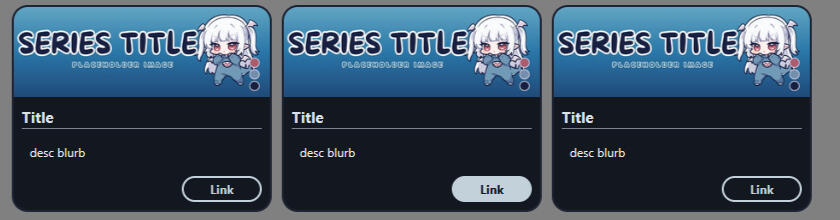
Scrollable Series Cards - Creds Mantarae
<div class="series-scroll">
<div class="seriesbox">
<img src="https://ella.janitorai.com/media-approved/fARCgglhywQtyj015QmO.webp" alt="seriesbanner">
<div class="overlay">
<div class="seriestitle">Title</div>
<div class="info">
<p>desc blurb</p>
</div>
<a href="LINK" rel="noopener noreferrer" class="serieslink">Link</a>
</div>
</div>
<div class="seriesbox">
<img src="https://ella.janitorai.com/media-approved/fARCgglhywQtyj015QmO.webp" alt="seriesbanner">
<div class="overlay">
<div class="seriestitle">Title</div>
<div class="info">
<p>desc blurb</p>
</div>
<a href="LINK" rel="noopener noreferrer" class="serieslink">Link</a>
</div>
</div>
<div class="seriesbox">
<img src="https://ella.janitorai.com/media-approved/fARCgglhywQtyj015Qm_O.webp" alt="seriesbanner">
<div class="overlay">
<div class="seriestitle">Title</div>
<div class="info">
<p>desc blurb</p>
</div>
<a href="LINK" rel="noopener noreferrer" class="serieslink">Link</a>
</div>
</div>
</div><style>
/* single series box */
.seriesbox {
flex: 0 0 260px;
display: flex;
flex-direction: column;
background: #131720;
border: 2px solid #1e2433;
box-sizing: border-box;
border-radius: 1rem;
overflow: hidden;
}
/* content wrapper */
.overlay {
display: flex;
flex-direction: column;
gap: 0.35rem;
padding: 0.5rem;
box-sizing: border-box;
}
/* banner */
.seriesbox img {
width: 100%;
height: 90px;
object-fit: cover;
display: block;
}
/* title */
.seriestitle {
font-size: 0.95rem;
font-weight: bold;
color: #dce4e9;
border-bottom: 1px solid #c2d1da99;
}
/* description */
.info {
flex: 1;
font-size: 0.75rem;
padding: 0.5rem;
overflow-y: auto;
}
/* link */
.serieslink {
font-size: 0.75rem;
text-decoration: none;
color: #c2d1da;
align-self: flex-end;
border: 2px solid #c2d1da;
border-radius: 2rem;
padding: 2px 5px;
min-width: 80px;
text-align: center;
transition: 600ms ease;
font-weight: bold;
}
/* link on hover */
.serieslink:hover {
border: 2px solid #c2d1da;
color: #131720;
background: #c2d1da;
}
.series-scroll {
display: flex;
flex-wrap: nowrap;
justify-content: flex-start;
gap: 10px;
padding: 1rem;
box-sizing: border-box;
overflow-x: auto;
}
</style>
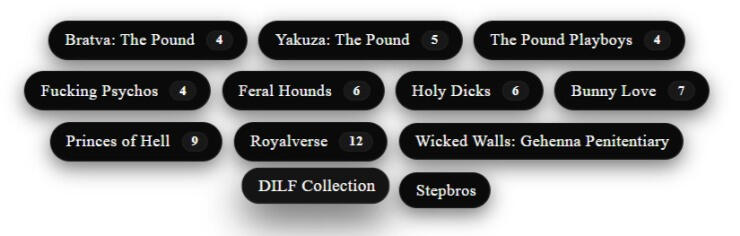
Series Tag Display - Creds Hime
<div class="tags-wrap">
<div class="tags">
<a href="taglink" class="tag">Series Title<span class="count">#NUMBER</span></a>
<a href="taglink" class="tag">Tag Name</a>
<a href="taglink" class="tag">Series Title<span class="count">#NUMBER</span></a>
<a href="taglink" class="tag">Tag Name</a>
</div>
</div><style>
.tags-wrap {
padding: 18px;
background: transparent;
display: flex;
justify-content: center;
}
.tags {
display: flex;
flex-wrap: wrap;
gap: 10px;
max-width: 900px;
align-items: center;
justify-content: center;
}
/*pill*/
.tag {
display: inline-flex;
align-items: center;
gap: 10px;
text-decoration: none;
background: #0a0a0a; /*change color here*/
color: #fff; /*text color*/
padding: 8px 14px;
border-radius: 999px;
font-size: 0.92rem;
line-height: 1;
letter-spacing: 0.02em;
border: 1px solid rgba(255,255,255,0.06);
box-shadow: 0 6px 18px rgba(0,0,0,0.55), inset 0 -1px 0 rgba(255,255,255,0.02);
transition: transform 160ms ease, box-shadow 160ms ease, background 160ms ease;
padding-right: 12px;
}
.tag .count {
background: rgba(255,255,255,0.06);
padding: 2px 8px;
border-radius: 999px;
font-weight: 700;
font-size: 0.75rem;
color: #fff;
border: 1px solid rgba(255,255,255,0.03);
}
.tag:hover {
transform: translateY(-4px) scale(1.02);
background: #141414;
box-shadow: 0 14px 34px rgba(10,10,10,0.7), inset 0 -1px 0 rgba(255,255,255,0.03);
outline: none;
}
/*responsive tweaksss*/
@media (max-width: 520px) {
.tag {
padding: 7px 10px;
font-size: 0.86rem;
}
.tag .count {
padding: 1px 6px;
font-size: 0.72rem;
}
}
</style>
Image Links Directory - Creds Crowbirdie
<style>
 .container {
 display: flex;
 }
 .left-image {
 flex: 1;
 flex-basis: 28%; /*Adjust width as needed*/
 }
 .right-images {
 display: flex;
 flex-direction: column;
 flex: 1;
 margin-left: -14%; /*ADJUST THESE TO MOVE RIGHT PICTURES*/
 margin-top: 7.5%; /*ADJUST THESE TO MOVE RIGHT PICTURES UP AND DOWN*/
 }
 .left-image img {
 width: 92%;
 float: right;
 margin-right: -8%;/*ADJUST THEIS TO MOVE LEFT PICTURE*/
 }
 .right-images img {
 width: 70%;
 float: left;
 margin-left: 2%; /*ADJUST THESE TO MOVE RIGHT PICTURES*/
 margin-bottom: 6%; /*ADJUST THESE TO MOVE RIGHT PICTURES*/
 border: 1px solid rgb(255 255 255 / 67%);/*color of border around pictures*/
 transition: box-shadow 0.6s; /*this is the animation for the glow-change speed if desired*/
 }
 .right-images img:hover {
 box-shadow: 0 0 10px 2px rgb(255 255 255 / 67%); /*color of the glow effect transition*/
 }
 .image-container {
 position: relative;
 display: inline-block;
 }
 .links { /*this is what keeps everything contained at the right size*/
 margin: 12px auto;
 padding: 13px;
 overflow: hidden;
 display: flex;
 justify-content: center; /*Center the content*/
 max-width: 526px; /*makes sure formatting is good for mobile*/
 }
 </style>
<div class="made-by-crowbirdie<3">
<div class="links">
<div class="container">
<div class="left-image">
<img src="https://i.imgur.com/86ziY2u.png" alt="Left-Image">
</div>
<div class="right-images">
<a href="https://janitorai.com/">
<img src="https://i.imgur.com/euLSuMH.png" alt="image-1">
</a>
<a href="https://janitorai.com/">
<img src="https://i.imgur.com/euLSuMH.png" alt="image-2">
</a>
<a href="https://janitorai.com/">
<img src="https://i.imgur.com/euLSuMH.png" alt="image-3">
</a>
</div>
</div>
</div>
Profile Tabs (Credits to Io)
<style><div class="tab-containerio">
.tab-containerio {
width: 100%;
margin-top: -400px;
left: 20px;
z-index: 5;
transform: rotate(-4deg);
position: relative;
}
.tabio:focus, .tabio:hover {
background: #000000;
z-index: 10;
position: relative;
}
.tabio {
display: inline-block;
padding: 2px;
font-family: 'Aldrich';
align-content: center;
width: fit-content;
height: 30px;
border: 1px solid white;
background: #0d0d0d;
}
.content-wrapperio {
position: relative;
height: 0;
overflow: hidden;
top: 10px;
transition: height 0.4s ease-in-out;
}
.tabio:nth-of-type(1):focus ~ .content-wrapperio,
.tabio:nth-of-type(2):focus ~ .content-wrapperio,
.tabio:nth-of-type(3):focus ~ .content-wrapperio,
.tabio:nth-of-type(4):focus ~ .content-wrapperio {
height: 200px;
}
.tabio:nth-of-type(1):focus ~ .content-wrapperio .contentio:nth-of-type(1),
.tabio:nth-of-type(2):focus ~ .content-wrapperio .contentio:nth-of-type(2),
.tabio:nth-of-type(3):focus ~ .content-wrapperio .contentio:nth-of-type(3),
.tabio:nth-of-type(4):focus ~ .content-wrapperio .contentio:nth-of-type(4) {
opacity: 1;
transform: translateY(0);
background: #000000de;
backdrop-filter: blur(1px);
padding: 10px;
overflow: auto;
border: 1px solid white;
}
.contentio {
position: absolute;
top: 0;
left: 0;
width: 100%;
height: 100%;
opacity: 0;
transform: translateY(100%);
transition: opacity .3s ease, transform .3s ease;
}
</style>
<div tabindex="0" class="tabio">current projects</div>
<div tabindex="0" class="tabio"> about me </div>
<div tabindex="0" class="tabio">"rules"</div>
<div tabindex="0" class="tabio">blacklist</div><div class="content-wrapperio">
<div class="contentio">
content here
</div>
<div class="contentio">
content here
</div><div class="contentio">
content here
</div><div class="contentio">
content here
</div>
</div>
Image Codes
Make an Image with a Link
<a href=" LINKY"><img src=" LINKY IMG"></a>
Basic image container with clickable images
<style>
 .image-container {
 display: flex;
 flex-direction: row;
 align-items: center;
 gap: 10px;
 margin-top: 10px;
 flex-wrap: wrap;
 }
 .friend{ /* adjust these parameters for image sizing */
 width: 100px;
 height: 100px;
 }
 </style>
<details>
<summary>Click!</summary>
<div class="image-container">
<a href="link1"><img src="imglink1" class="friend" draggable="false"></a>
<a href="link2"><img src="imglink2" class="friend" draggable="false"></a>
<a href="link3"><img src="imglink3" class="friend" draggable="false"></a>
<a href="link4"><img src="imglink4" class="friend" draggable="false"></a>
<a href="link5"><img src="imglink5" class="friend" draggable="false"></a>
<a href="link6"><img src="imglink6" class="friend" draggable="false"></a>
</details>
</div>
Animation Keyframes
Removing Animations for Users Using Reduced Motion - Creds to Tigerdropped
@media screen and (prefers-reduced-motion: no-preference) {
 .element {
 animation: ;
 }
 }
Breathing Animation
@keyframes breathing {
 0% {
 transform: translateY(0px);
 }
 50% {
 transform: scale(1.05) translateY(-10px);
 }
 100% {
 transform: translateY(0px);
 }
 }
Pulse/Heartbeat Animation
@keyframes heartbeat
 {
 0% {
 transform: scale( .75 );
 }
 20% {
 transform: scale( 1 );
 }
 40% {
 transform: scale( .75 );
 }
 60% {
 transform: scale( 1 );
 }
 80% {
 transform: scale( .75 );
 }
 100% {
 transform: scale( .75 );
 }
 }
Misc Codes
Adding Pixel Borders to a container - Credits
.css-YOURELEMENT {
 clip-path: polygon(0px calc(100% - 20px),
 4px calc(100% - 20px),
 4px calc(100% - 12px),
 8px calc(100% - 12px),
 8px calc(100% - 8px),
 12px calc(100% - 8px),
 12px calc(100% - 4px),
 20px calc(100% - 4px),
 20px 100%,
 calc(100% - 20px) 100%,
 calc(100% - 20px) calc(100% - 4px),
 calc(100% - 12px) calc(100% - 4px),
 calc(100% - 12px) calc(100% - 8px),
 calc(100% - 8px) calc(100% - 8px),
 calc(100% - 8px) calc(100% - 12px),
 calc(100% - 4px) calc(100% - 12px),
 calc(100% - 4px) calc(100% - 20px),
 100% calc(100% - 20px),
 100% 20px,
 calc(100% - 4px) 20px,
 calc(100% - 4px) 12px,
 calc(100% - 8px) 12px,
 calc(100% - 8px) 8px,
 calc(100% - 12px) 8px,
 calc(100% - 12px) 4px,
 calc(100% - 20px) 4px,
 calc(100% - 20px) 0px,
 20px 0px, 20px 4px, 12px 4px, 12px 8px, 8px 8px,
 8px 12px, 4px 12px, 4px 20px, 0px 20px);
 }
Animated Page Doll with a floating animation
<style>
 .page-doll {
 position: fixed;
 bottom: 10px; /*For positioning. Adjust as needed. Can change 'bottom' to 'top'*/
 right: 10px; /*For positioning. Adjust as needed. Can change 'right' to 'left'*/
 z-index: 1000;
 animation: float 3s ease-in-out infinite;
 }
 .page-doll img {
 width: --px; /*Change -- to the size you want the page doll to be*/
 height: auto;
 cursor: pointer;
 }
 @keyframes float {
 0% {
 transform: translateY(0);
 }
 50% {
 transform: translateY(-20px);
 }
 100% {
 transform: translateY(0);
 }
 }
 </style>
<div class="page-doll">
<img src="IMAGE LINK" alt="Page Doll">
</div>
| Link | Description | Type |
|---|---|---|
| CSS Beautifier | Format CSS | Tool |
| HTML Formatter | Format HTML | Tool |
| Custom Border Radius Creator | Custom Border Radius Made Easy | Generator |
| Card Generator | Basic HTML/CSS Card | Generator |
| HTML Generator | Variety of HTML Tools | Generator |
| CSS Generator | Variety of CSS Tools | Generator |
| Animista | Animation keyframes | Generator |
| Color Palette Generator | Color Palettes | Generator |
| CSS Gradients | Gradients | Library |
| Gradients | Gradients | Library |
| Gradient Buttons | Gradient Buttons | Library |
| CSS Visual Editor | Profile customization made easy by Fechin | Tool/Generator |
| Link | Description | Creator |
|---|---|---|
| MDN Web Docs | A complete list of CSS properties, each page includes a thorough rundown of information such as: browser availability, definitions, formal syntax, interactive examples, and sometimes further things to take into account. | |
| Beginner's Guide to CSS! | Beginners visual guide and code code catalog | Crowbird |
| W3schools | Same as MDN, but less technical, not as thorough but still good, neatly presented explanations, syntax and examples. | |
| BASICS OF PROFILE CUSTOMIZATION | desc | Reo |
| Markdown, HTML and CSS on JAI | desc | Lunaxlee |
| Guide to Making Clip-Paths | A step by step guide on how to go from an image to usable clip-path css | Mantarae |
| Color Toggle and Guide | Basic color toggle and explanation | Rocket |
| Guide to Media Queries | This is a quick rundown of how to use media queries to size your elements according to the screen and viewport size | Puppy |
Visual Guides
| Link | Description | Creator |
|---|---|---|
| Video Tutorial | A step-by-step video tutorial for both computer and mobile users | Bluem |
| Video Tutorial Pt1 | Video Tutorial Pt2 | Video Tutorial Pt3 | This tutorial is designed primarily for users coding on their phones, though computer users can follow along as well | Aresangell |
| Visual CSS Guide | A visual guide for customizing and decorating your profile. While it’s primarily designed for computer users, mobile users can also follow along using the provided codes. | Oishidesuu |
Grid / flex
| Link | Description | Creator |
|---|---|---|
| CSS Flexbox Layout Guide | This complete guide explains everything about flexbox, focusing on all the different possible properties for the parent element (the flex container) and the child elements (the flex items) | |
| CSS Media Queries Guide | Media queries can modify the appearance (and even behavior) of a website or app based on a matched set of conditions about the user’s device, browser or system settings | |
| Flexbox Froggy | Game to learn how to make flexboxes!! |
List of Templates - JanitorAI Official Discord Server
Full Profile Templates
Io's Profile Template - Desc
Hacker/Terminal/Glitch Template - By Lumiq
Hello Kitty Template - By Lumiq
Pink Profile Template - By Lav
Demon Profile Template - By Lav
Bratva Template - By Hime
Cyanoide's CSS Templates - Starlit Moments and Witches 'n Whispers
Hachiware Template - By Milo
Monochrome Flowers Template - By Radi
Elmo Template - By Roselil
Mitsuaya Template - By Vkeis
Black & White Base Template - By Doebunnies
Monochrome Computer Screen Template - By Cyanoide
Stardew Valley Template - By Roselil
Pink Retro Template - By K6tli
Sleek Black Simplistic Template - By Radi
Black & Berry Template - By Yuyu
Casino Template - By Lav
Nature Template - By Mya
SIMPLE UI TEMPLATE - By Eira
Retro / Hippie Template - By Mantarae
Profile Bio Templates
Split Profile Card (Left) - By Tigerdropped
Split Profile Card (Right) - By Tigerdropped
Carrd-Inspired Profile Card - By Tigerdropped
Two Column Bio-Grid - By Hime
Bot Card Templates
Horizontal Bot Card - By Puppy
Flip Effect - By Tigerdropped
Hover For Details - By Puppy
Horizontal Bot Card With Round Image - By Lugubrious
Unstyled horizontal grid botcard - By Milo
Cat themed bot cards - By Cyanoide
Postcard inspired botcard - By Milo
Grid bot card - By Maddie
Game-Boy Bot Cards - By Coir
Video Game Bot Cards - By Lain
Band Tour Bot Cards - By MantaRae
Other Elements
Color Toggles - By Rocket
Search Bar Customization - By Procrastination
Profile Tabs - By Manta
To Be Added....